
JPS TTS: SeQent Integration Requirements
Short answer
SeQent's FPLNKTTS reads alarm messages aloud on radio talk groups through a JPS NXU-2B or RSP-Z2 device connected to a Control Station radio.
SeQent's FirstPAGE Link for TTS (FPLNKTTS) delivers audible text-to-speech messages to radio channels and talk groups through a JPS Interoperability Solutions NXU-2B or RSP-Z2 device and a Control Station radio.
1. Abbreviations & Definitions
| Abbreviation | Definition |
|---|---|
FP | FirstPAGE |
FPAM | FirstPAGE Alarm Manager |
FPLNKTTS | FirstPAGE Link for TTS |
TTS | Text-to-Speech |
2. Environment Requirements
The following must be in place for FPLNKTTS integration:
- A VM or PC to host
FPLNKTTS. - A network connection between the VM/PC host and the JPS
NXU-2BorRSP-Z2device. A static IP address must be provisioned for each device. - A serial connection between the JPS
NXU-2BorRSP-Z2device and compatible Control Station radio(s), using the JPS Interface serial cable(s) supplied by JPS with the device. - Firewall rules prepared (if required). See 7. Port Tables.
- To be provided by the radio dealer:
- JPS
NXU-2BorRSP-Z2device(s), including the JPS Interface serial cable(s) for the chosen Control Station radio model(s). - Programmed, compatible Control Station radio(s).
NXU-2Bis a 1:1 relationship of device to Control Station;RSP-Z2is 1:2. See 4. Radio Programming. - Programming for receiving radios. See 4. Radio Programming.
- Configuration for the
NXU-2BorRSP-Z2device(s). See 5. JPS Configuration: NXU-2B and 6. JPS Configuration: RSP-Z2.
- JPS
Talk Group coverage: There is a 1:1 relationship between a Control Station and the Talk Group that will receive audible notifications. Combine multiple
NXU-2Band/orRSP-Z2devices to ensure all necessary Talk Groups are covered.
3. SeQent Installation and Validation
- Install SeQent
FPLNKTTSsoftware. - In
FPLNKTTS, create a Channel:- Name: A name corresponding to the Talk Group this Channel relates to.
- SNPP ID: A user-generated ID for this Channel, used as the Network ID for the corresponding Destination in FirstPAGE.
- NXU Host: The static IP address of the
NXU-2BorRSP-Z2device used for this Talk Group output. - NXU TCP Port: Default
1221. - NXU UDP Port: Default
1221. - Voice: Select the desired SAPI Engine compatible voice from the dropdown list.
- In
FPLNKTTS, create an SNPP User and set a username and password. - In
FPLNKTTS, select the Channel in the tree view, right-click, and send a test message to validate connectivity and configuration fromFPLNKTTS> JPS device > Control Station.
4. Radio Programming
4.1 Control Station
Apply the following programming to each Control Station radio broadcasting audible TTS messages:
- Ensure the desired Talk Group is set.
- Ensure GPIO Pin 1 is set to External Mic. PTT (Input Active Low/High).
Note: Whether Input Active must be Low or High may differ depending on the radio model used as the Control Station.
4.2 Receiving Radios
Apply the following programming to each radio participating in the audible TTS solution:
- Ensure the Talk Groups that Control Stations will dispatch audible TTS messages over are set.
5. JPS Configuration: NXU-2B
See JPS’ Installation and Operation Manual: https://jps.sharefile.com/share/view/s68dcc6772ce7422aa920a5230f3ed6ef
- With the
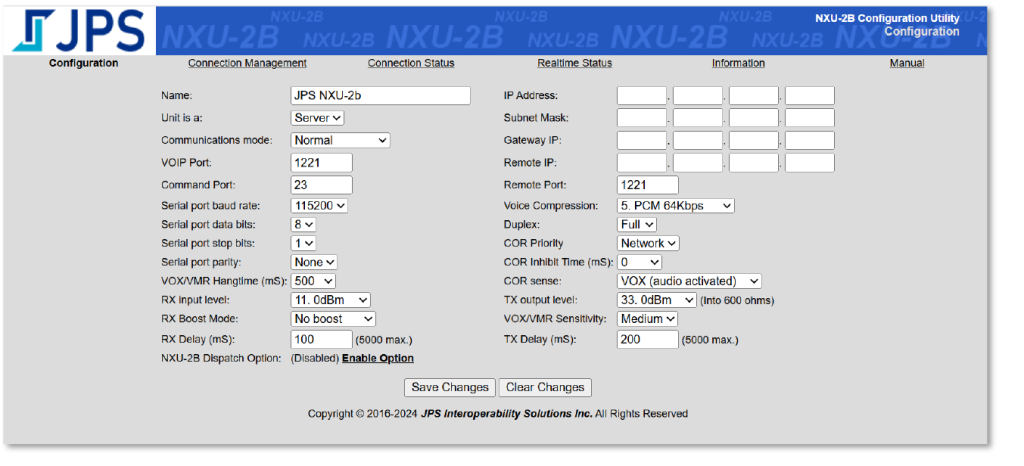
NXU-2Bconnected to a VM or PC, use a web browser to navigate to the device’s default IP address,192.168.1.200. - Set the following values and click Save Changes.
| Option | Value | Option | Value |
|---|---|---|---|
| Name | [Provide an appropriate device name] | IP Address | [Set the provisioned IP address] |
| Unit is a | Server | Subnet Mask | [Set to required subnet mask] |
| Communication mode | Normal | Gateway IP | [Set to required Gateway IP] |
| VOIP Port | 1221 | Remote IP | 0.0.0.0 |
| Command Port | 23 | Remote Port | 1221 |
| Serial port baud rate | 115200 | Voice Compression | 5. PCM 64Kbps |
| Serial port data bits | 8 | Duplex | Full |
| Serial port stop bits | 1 | COR Priority | Network |
| Serial port parity | None | COR Inhibit Time (mS) | 0 |
| VOX/VMR Hangtime (mS) | 500 | COR sense | VOX (audio activated) |
| RX Input level | 11.0dBm | TX output level | 33.0dBm |
| RX Boost Mode | No boost | VOX/VMR Sensitivity | Medium |
| RX Delay (mS) | 100 | TX Delay (mS) | 200 |
Note: Newer device firmware may introduce additional settings. Unless otherwise specified, leave additional settings at their default values.
Example screenshot of NXU-2B configuration (IP hidden):
Contact SeQent Support (Support@SeQent.com) if you require further assistance.
6. JPS Configuration: RSP-Z2
See JPS’ Getting Started directions: https://support.jps.com/hc/en-us/articles/6003171866515-Getting-Started-with-Your-New-JPS-Z-Series-Product
6.1 Network settings
- With the
RSP-Z2connected to a VM or PC, use a web browser to navigate to the device’s default IP address,192.168.1.200. - In Network Settings:
- Set the System IP Address to the address provisioned by the customer.
- Set the Subnet Mask as required.
- Set the Gateway IP as required.
6.2 Network stacks and resources
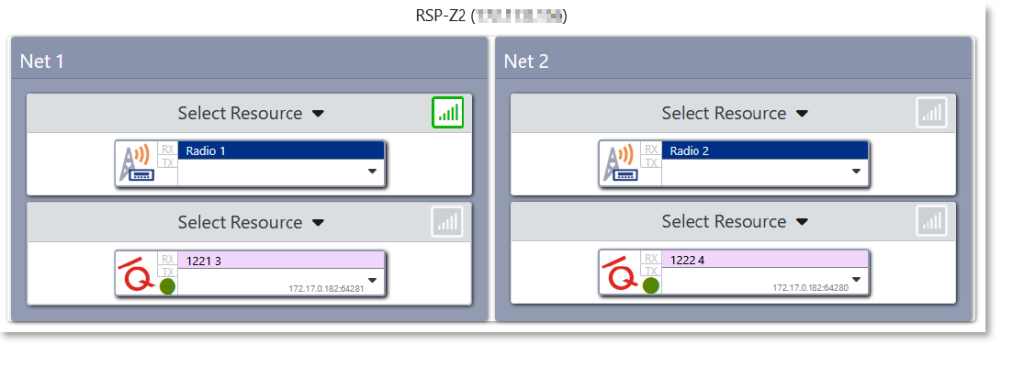
The RSP-Z2 has two network stacks, Net 1 and Net 2. Each corresponds to a single channel input from FPLNKTTS and a single output to a Control Station. Each Net contains two resources: the top resource is the output connection to the Control Station, and the bottom resource is the input connection from FPLNKTTS.
Example screenshot of RSP-Z2 resources (IP hidden):
6.3 FPLNKTTS input resource configuration
| Section | Setting | Value |
|---|---|---|
| General | Type | JPS RoIP |
| General | Name | An appropriate resource name, such as “FPLNKTTS [Port N°]” |
| Customization | Icon Type / Icon | Recommended: Third Party Icons / SeQent |
| Connection | RoIP Mode | Normal |
| Connection | Connection Method | Server |
| Connection | Local Port | 1221 |
| Audio Control | RX Gain | 0 dB |
| Audio Control | Audio Codec | G.711 u-Law (64kbps) |
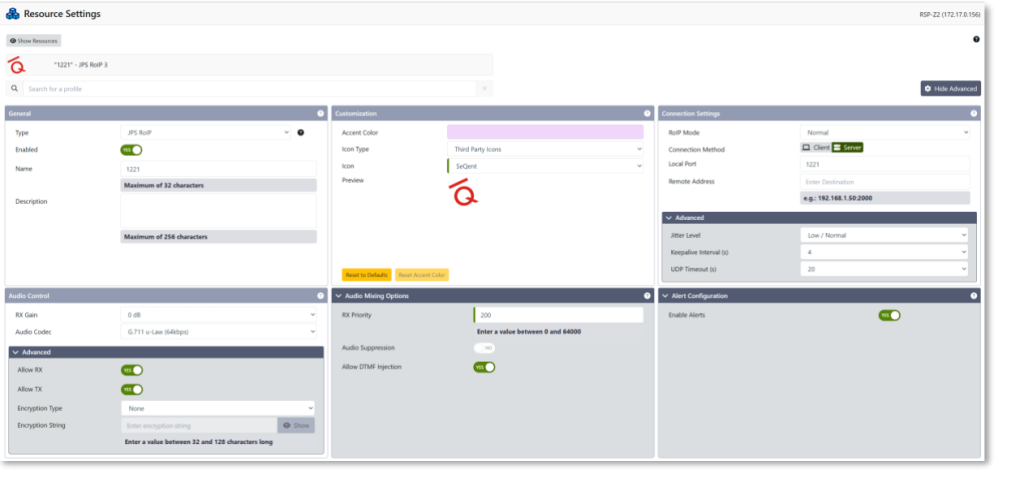
All other settings can be left as default.
Example screenshot of RSP-Z2 input resource:
6.4 Control Station output resource configuration
| Section | Setting | Value |
|---|---|---|
| General | Type | Radio |
| General | Name | An appropriate resource name, such as the Control Station’s Radio ID or a name corresponding to the Talk Group being used |
| Audio Control | RX Detection Type | Audio Level Detect (VOX) |
| Audio Control | RX Threshold | Normal |
| Audio Control | RX Hangtime (ms) | 500 |
| Audio Control | Duplex | Full |
| Audio Control > Advanced | Allow RX | Yes |
| Audio Control > Advanced | Allow TX | Yes |
| Audio Control > Advanced | RX Timeout | 2 Minutes |
| Audio Control > Advanced | TX Timeout | 2 Minutes |
| Audio Adjustments | RX Level (Input) | 0 dBm [3] |
| Audio Adjustments | TX Level (Output) | 0 dBm [6] |
| Transmit Delay | TX Delay Type | Constant |
| Transmit Delay | TX Delay (ms) | 0 |
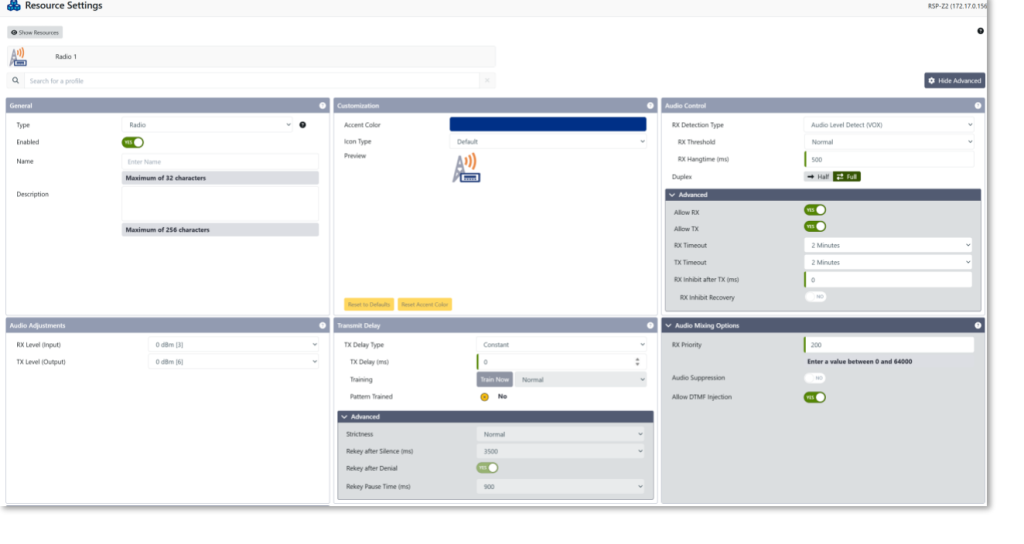
All other settings can be left as default.
Example screenshot of RSP-Z2 output resource:
7. Port Tables
Inbound
| Name | Local Address | Protocol | Local Port | Remote Address | Remote Port(s) | Notes |
|---|---|---|---|---|---|---|
| FP Link for TTS – SNPP | FirstPAGE Link host IP Address | TCP | 444 | FirstPAGE Server IP Address | Any | FirstPAGE connection to FPLNKTTS. |
Outbound
| Name | Local Address | Protocol | Local Port | Remote Address | Remote Port(s) | Notes |
|---|---|---|---|---|---|---|
| FP Link for TTS – NXU-2B | FirstPAGE Link host IP Address | TCP/UDP | Any | NXU-2B IP Address | 1221 | Communication with JPS NXU-2B over default port. |
| FP Link for TTS – RSP-Z2 | FirstPAGE Link host IP Address | TCP/UDP | Any | RSP-Z2 IP Address | 1221/1223 | Communication with JPS RSP-Z2 over default ports. |
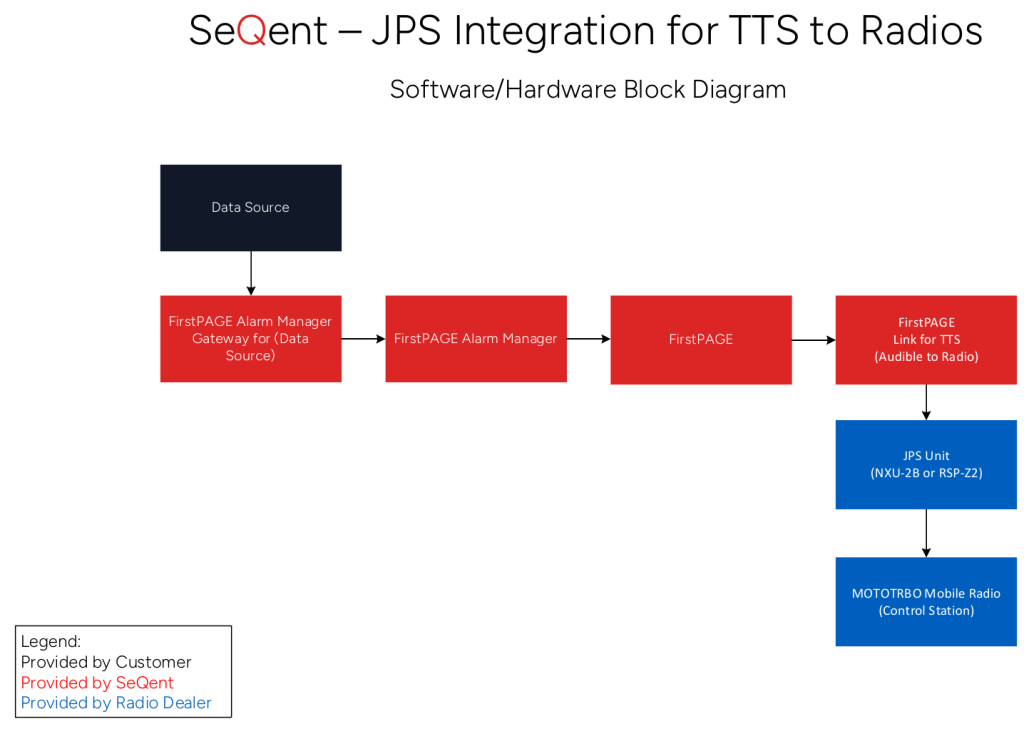
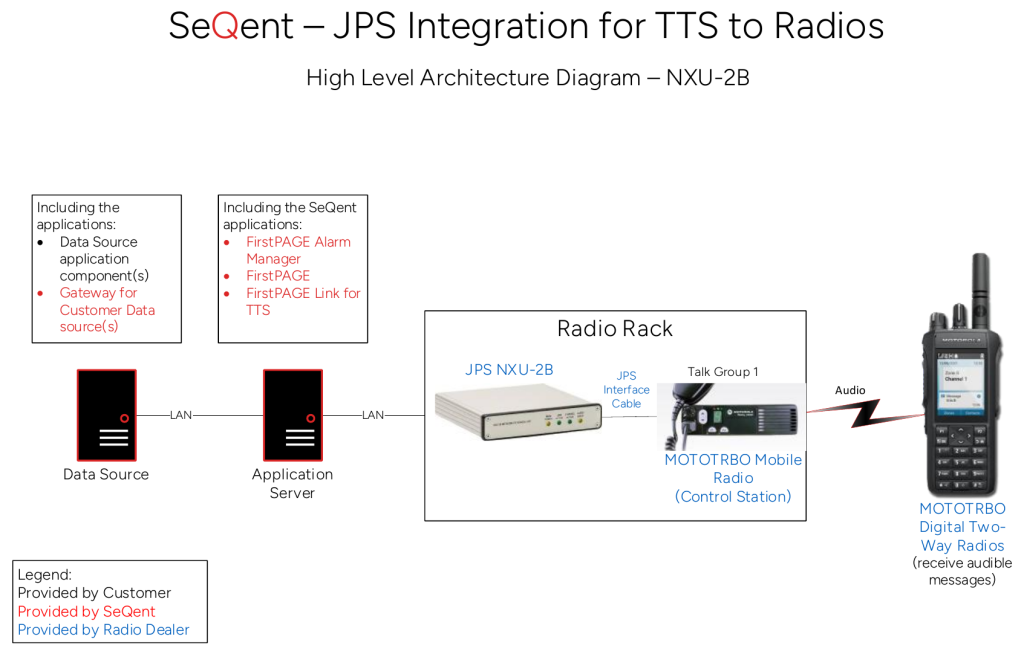
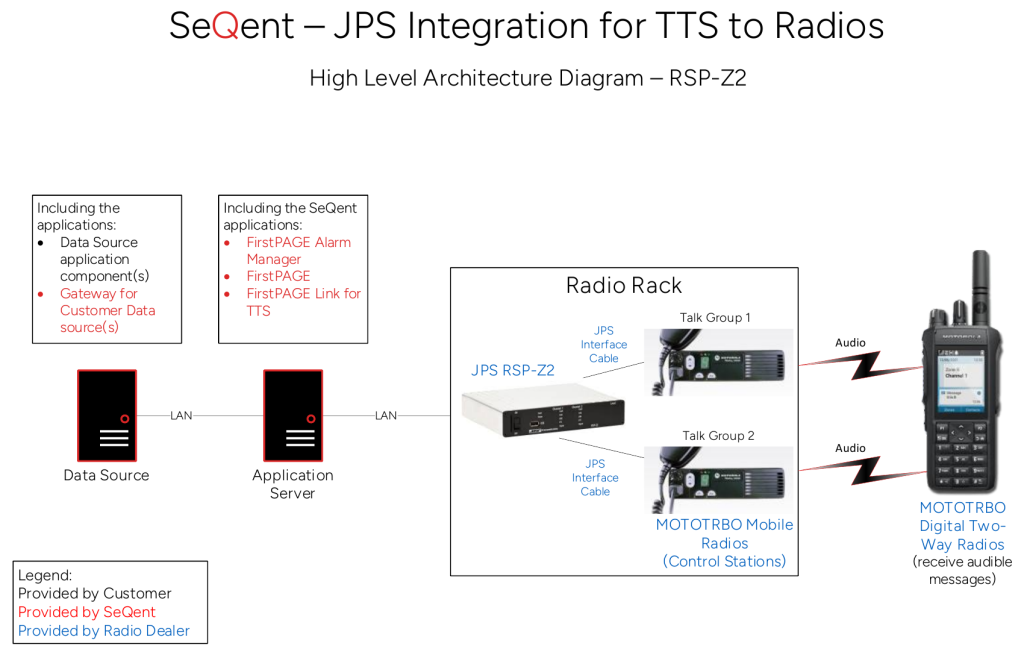
8. Architecture Diagrams
Block Diagram
Architecture Diagram (Option 1 – NXU-2B)
Architecture Diagram (Option 2 – RSP-Z2)

Looking for more?
Licensed customers can log in to the Customer Care Portal for detailed troubleshooting guides, release notes, and product downloads.


