
Motorola Capacity Max: SeQent Integration Requirements
Short answer
SeQent's FPLNKCAPMAX sends text alarms to Motorola Solutions digital radios through a connection to a Capacity Max System Server (CMSS).
SeQent's FirstPAGE Link for CAPMAX (FPLNKCAPMAX) delivers text-based messages to Motorola Solutions digital radios through a connection to a Capacity Max System Server (CMSS).
1. Abbreviations & Definitions
| Abbreviation | Definition |
|---|---|
FP | FirstPAGE |
FPAM | FirstPAGE Alarm Manager |
FPLNKCAPMAX | FirstPAGE Link for CAPMAX |
CAPMAX | Capacity Max |
CMSS | Capacity Max System Server |
MNIS | MOTOTRBO Network Interface Service |
2. Environment Requirements
The following must be in place for FPLNKCAPMAX integration:
- A VM or PC to host
FPLNKCAPMAXand Motorola Solutions’ MNIS software. - A network connection between the VM/PC host and the CMSS Presence Server. See 5. Port Tables to prepare firewall rules (if required).
- To be provided by the radio dealer:
- Motorola Solutions licenses for MNIS (applied in Radio Management).
- MNIS Data Gateway Configuration Utility (software installation).
- MNIS Data configuration (created in Radio Management):
- Exported as a
.gwcfgxfile. - Applied to the MNIS installation on the target host VM/PC.
- Exported as a
3. Information to Collect from the Radio Dealer
| Item | Default / Notes |
|---|---|
| Gateway Tunnel IP address | Site-specific |
| TMS UDP port | 4007 |
| Remote MNIS Control Interface TCP port | 55000 |
| Data Gateway Radio ID | SeQent default 65535. This is the unique ID to be configured for MNIS. |
| Presence Server IP address | Include the IP address for the alternate CMSS if applicable. |
| Presence Server port | 50015. Include the port for the alternate CMSS if applicable. |
4. Software Installation and Validation
- Install Motorola Solutions MNIS software.
- Install SeQent
FPLNKCAPMAXsoftware. - Create and export the MNIS configuration in
.gwcfgxformat using Radio Management. - Open the MNIS Data Gateway Configuration Utility.
- Select Configuration and choose Import. Select the MNIS configuration exported from Radio Management and press Open.
- Select Configuration and choose Select Active Configuration. Select the desired MNIS configuration file and press OK.
- Stop the MNIS service and restart it.
- Ping a radio to validate MNIS functionality.
- Select the ID of a radio that is in a known On state.
- Use a tool such as https://www.browserling.com/tools/dec-to-ip to convert the radio ID from a decimal value to an IP value, then change the first octet from
0to12. Example: Radio ID1234>0.0.4.210>12.0.4.210. - In a CMD window, ping the resulting IP. Example:
ping 12.0.4.210
- In
FPLNKCAPMAX, configure the CAPMAX tab using the information provided by the radio dealer when performing the “New Server” step. - In
FPLNKCAPMAX, create an SNPP User and set a username and password. - In
FPLNKCAPMAX, create Talk Groups (if required). - In
FPLNKCAPMAX, select a radio listed as Present in the Radio Status node and right-click to send a test message. - Test radio presence by turning the radio off, refreshing Radio Status in
FPLNKCAPMAX, then turning the radio back on and doing the same.
Note: A successful persistent ping (step 5) confirms that the MNIS configuration and networking are working.
5. Port Tables
Inbound
| Name | Local Address | Protocol | Local Port | Remote Address | Remote Port(s) | Notes |
|---|---|---|---|---|---|---|
| FP Link for CAPMAX – TMS (IN) | FirstPAGE Link host IP Address | UDP | 4007 | Radio IP Address | Any | TMS Delivery Confirmation from Motorola Solutions Radios. |
| FP Link for CAPMAX – SNPP | FirstPAGE Link host IP Address | TCP | 444 | FirstPAGE Server IP Address | Any | FirstPAGE connection to FPLNKCAPMAX. |
Outbound
| Name | Local Address | Protocol | Local Port | Remote Address | Remote Port(s) | Notes |
|---|---|---|---|---|---|---|
| FP Link for CAPMAX – CMSS | FirstPAGE Link host IP Address | TCP | Any | Primary (and alternate) CMSS Presence Server IP address(es) | 50015 | 50015 is the Motorola Solutions default; please confirm with the radio dealer. |
| FP Link for CAPMAX – TMS (OUT) | FirstPAGE Link host IP Address | UDP | Any | Radio IP Address | 4007 | TMS Delivery to Motorola Solutions Radios. |
| MNIS | FirstPAGE Link host IP Address | UDP | Any | Primary (and alternate) CMSS Presence Server IP address(es) | 50000 | 50000 is the Motorola Solutions default; please confirm with the radio dealer. |
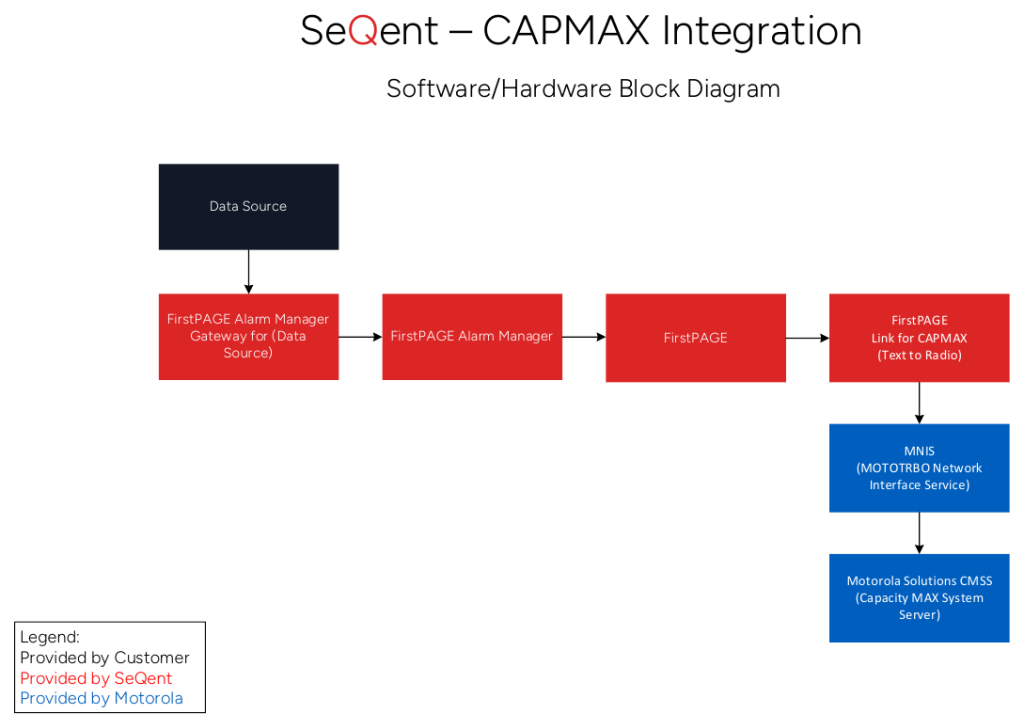
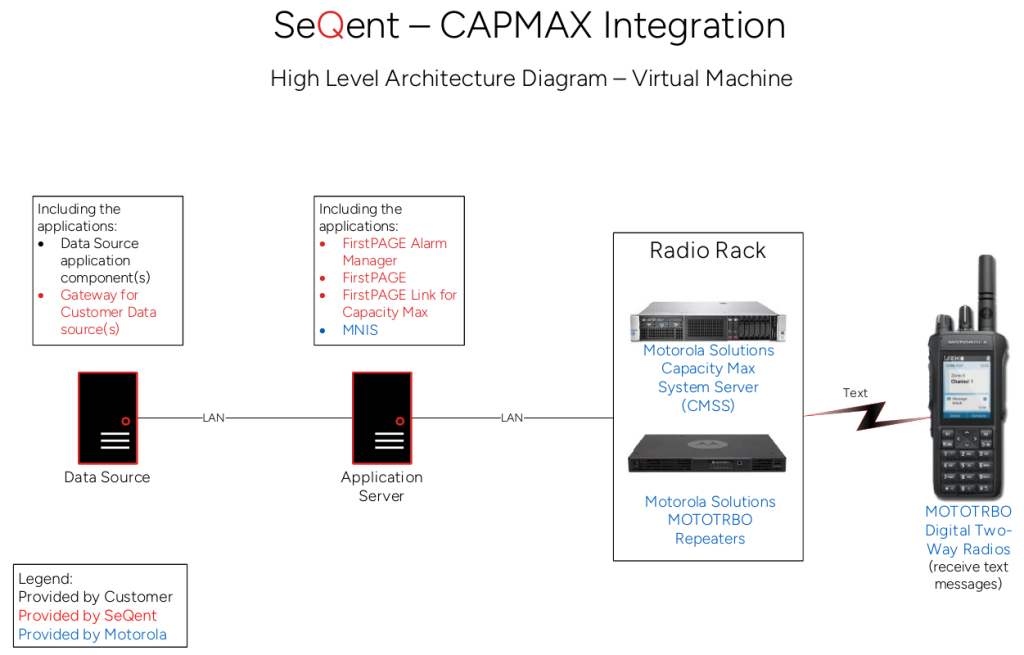
6. Architecture Diagrams
Block Diagram
Architecture Diagram (Option 1 – VM)

Looking for more?
Licensed customers can log in to the Customer Care Portal for detailed troubleshooting guides, release notes, and product downloads.


