
MOTOTRBO TRBODirect: SeQent Integration Requirements
Short answer
SeQent's FPLNKTRBODirect texts alarms to MOTOTRBO radios through a Control Station radio connected to the host, for systems with no repeater.
SeQent's FirstPAGE Link for TRBODirect (FPLNKTRBODirect) delivers text-based messages to Motorola Solutions digital radios through a Control Station radio connected directly to the host. It enables texting to MOTOTRBO radios in systems where no repeater is present.
1. Abbreviations & Definitions
| Abbreviation | Definition |
|---|---|
FP | FirstPAGE |
FPAM | FirstPAGE Alarm Manager |
FPLNKTRBODirect | FirstPAGE Link for TRBODirect |
TRBODirect | MOTOTRBO Direct connection (via Control Station) |
DDMS | Device Discovery and Mobility Service (Motorola Presence Notifier Application) |
2. Environment Requirements
The following must be in place for FPLNKTRBODirect integration:
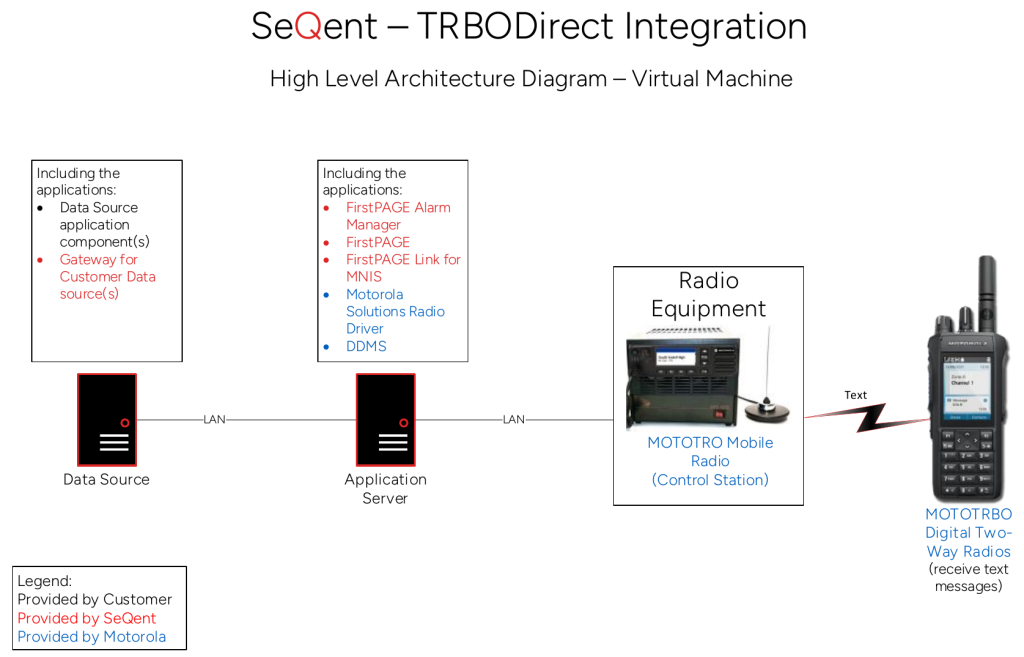
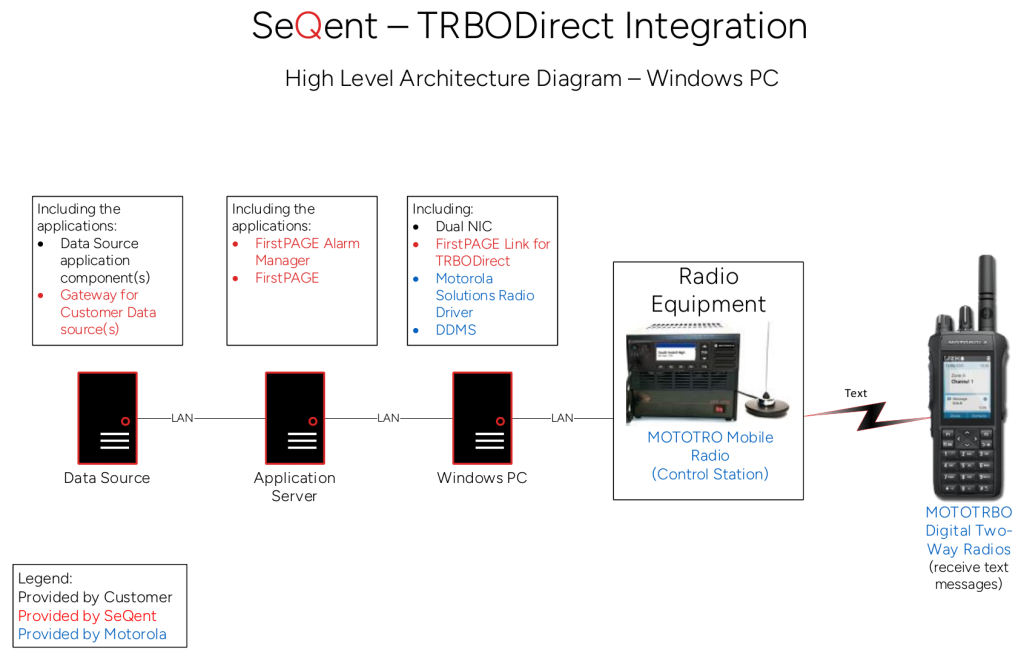
- A VM or PC to host
FPLNKTRBODirectand Motorola Solutions’ DDMS software. - A USB connection between the VM/PC host and the Motorola Solutions radio being used as a Control Station.
- Firewall rules prepared (if required). See 6. Port Tables.
- To be provided by the radio dealer:
- A programmed Motorola Solutions radio to be used as the Control Station.
- A USB programming cable for the connection between the VM/PC and the Control Station.
- Motorola Solutions Radio Driver (software installation).
- Motorola Solutions DDMS (software installation).
- Programming for radios. See 5. Radio Programming.
3. Information to Collect from the Radio Dealer
| Item | Default / Notes |
|---|---|
| Control Station ID | SeQent default 65535. This is the unique ID for the radio being used as the Control Station. |
| Digital Talk Path | The Digital Talk Path used for broadcasting text messages. |
4. Software Installation and Validation
- Install the Motorola Solutions Radio Driver (no configuration required).
- Install Motorola Solutions DDMS software (no configuration required).
- Install SeQent
FPLNKTRBODirectsoftware. - Ensure a persistent route exists, using CMD:
- Check routes using the
route printcommand. - If a
12.0.0.0route does not yet exist, create one:route -p add 12.0.0.0 mask 255.0.0.0 192.168.10.1
- Check routes using the
- Ping a radio to validate functionality:
- Select the ID of a radio that is in a known On state.
- Use a tool such as https://www.browserling.com/tools/dec-to-ip to convert the radio ID from a decimal value to an IP value, then change the first octet from
0to12. Example: Radio ID1234>0.0.4.210>12.0.4.210. - In a CMD window, ping the resulting IP. Example:
ping 12.0.4.210
- In
FPLNKTRBODirect, configure the TRBODirect tab:- Control Station IP address: default
192.168.10.2 - TMS UDP port: default
4007 - Control Station ID: SeQent default
65535 - DDMS host:
LOCALHOST
- Control Station IP address: default
- In
FPLNKTRBODirect, create an SNPP User and set a username and password. - In
FPLNKTRBODirect, create Talk Groups (if required). Only the ID for the designated Digital Talk Path can be set up. - In FirstPAGE, after configuring an SNPP Level-2 or Level-3 provider connected to
FPLNKTRBODirectand a corresponding destination using a radio ID, send a test message to a known On radio. - Test radio presence in
FPLNKTRBODirectusing the Radio Status node in the tree view. Turn the radio off and refresh Radio Status to see presence update from Present to Absent.
Note: A successful persistent ping (step 5) confirms that the connection to the Control Station is working.
5. Radio Programming
5.1 Control Station
Apply the following programming to the Control Station radio broadcasting text messages to subscriber radios:
| Setting | Value |
|---|---|
| ARS Radio ID | Unpopulated |
| TMS Radio ID | Unpopulated |
| TMS UDP port | Confirm (default 4007) |
| ARS setting for Digital Talk Path | Disabled |
5.2 Receiving Radios
Apply the following programming to each radio participating in the text-message solution:
| Setting | Value |
|---|---|
| ARS Radio ID | Same value as the Control Station ID (SeQent default 65535) |
| TMS Radio ID | Same value as the Control Station ID (SeQent default 65535) |
| ARS UDP port | Motorola Solutions default 4005 |
| TMS UDP port | Motorola Solutions default 4007 |
| ARS setting for the Digital Talk Path | On System Change. With a single Control Station, only the one designated Digital Talk Path requires this selection. |
| Texting | Enabled |
6. Port Tables
Inbound
| Name | Local Address | Protocol | Local Port | Remote Address | Remote Port(s) | Notes |
|---|---|---|---|---|---|---|
| FP Link for TRBODirect – TMS (IN) | FirstPAGE Link host IP Address | UDP | 4007 | Radio IP Address | Any | TMS Delivery Confirmation from Motorola Solutions Radios. |
| FP Link for TRBODirect – SNPP | FirstPAGE Link host IP Address | TCP | 444 | FirstPAGE Server IP Address | Any | FirstPAGE connection to FPLNKTRBODirect. |
| DDMS | FirstPAGE Link host IP Address | UDP | 4005 | Radio IP Address | Any | ARS response from Motorola Solutions Radios. |
Outbound
| Name | Local Address | Protocol | Local Port | Remote Address | Remote Port(s) | Notes |
|---|---|---|---|---|---|---|
| FP Link for TRBODirect – TMS (OUT) | FirstPAGE Link host IP Address | UDP | Any | Radio IP Address | 4007 | TMS Delivery to Motorola Solutions Radios. |
| DDMS | FirstPAGE Link host IP Address | UDP | Any | Radio IP Address | 4005 | ARS request to Motorola Solutions Radios. |
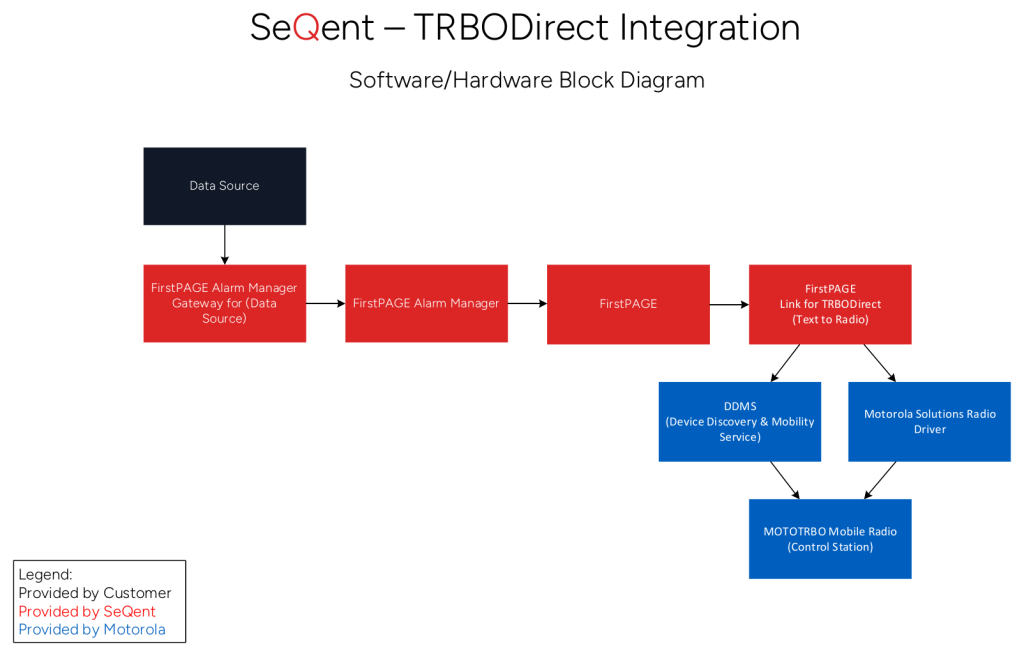
7. Architecture Diagrams
Block Diagram
Architecture Diagram (Option 1 – VM)
Architecture Diagram (Option 2 – PC)

Looking for more?
Licensed customers can log in to the Customer Care Portal for detailed troubleshooting guides, release notes, and product downloads.


